Local LLM economics: research summary
March 2026. Analysis source: scripts/analysis/economics-of-local-llms.py (run via npm run analyze). Data: hardware · models · fit matrix · frontier. Charts live in public/assets/economics-of-local-llms/.
The research for this article was conducted in Australia, thus the conversion of AU to USD prices. I first started with a jupytr notebook, but eventually switched to pure python. The format for jupytr notebooks is json and base64 encoded data; parsing this is very inefficient for models. I used up over half of my API credits at the $20 tier frighteningly quickly. Some quick searching didn't reveal any well regarded AI skills for dealing with this issue. There's a good opportunity here for the jupytr community to plug the skill and discoverability gap.
Research questions
- Can good models run on commodity hardware today?
- What defines a "good" model, and what resources does it need?
- What are the specs of current commodity hardware?
- When will reasonably priced hardware comfortably run good models?
- What is the price premium for local inference vs cloud API spend?
1. Can good models run on commodity hardware today?
Short answer: barely, and only on high-end MacBooks.
As of March 2026, running a model that scores MMLU >= 80 (the threshold we use for "good") requires at minimum a ~27B-parameter model at q4 quantization. The smallest such model today is Gemma 3 27B (MMLU 82, q4 artifact: 17.0 GiB). With a 2.5 GiB runtime margin, that is 19.5 GiB of unified memory consumed by the model alone.
After accounting for macOS overhead (3.5 GiB) and a heavy development workflow (6.5 GiB for IDE, browser, terminals, etc.), the total memory budget needed is ~29.5 GiB.
This means:
- A MacBook Air M5 16 GB cannot run it under any realistic scenario.
- A MacBook Air M5 32 GB can technically load it with OS-only overhead, but a developer workflow eats the margin.
- A MacBook Pro 16" M5 Pro 48 GB ($3,090 USD) is the first machine where it fits comfortably with a full dev environment running (headroom: ~8.5 GiB).
- A MacBook Pro 16" M5 Pro 64 GB ($3,280 USD) gives ~24.5 GiB of headroom.
So: yes, a good model can run on a single MacBook, but only on the Pro tier at $3,000+. That is not "commodity" for most people.
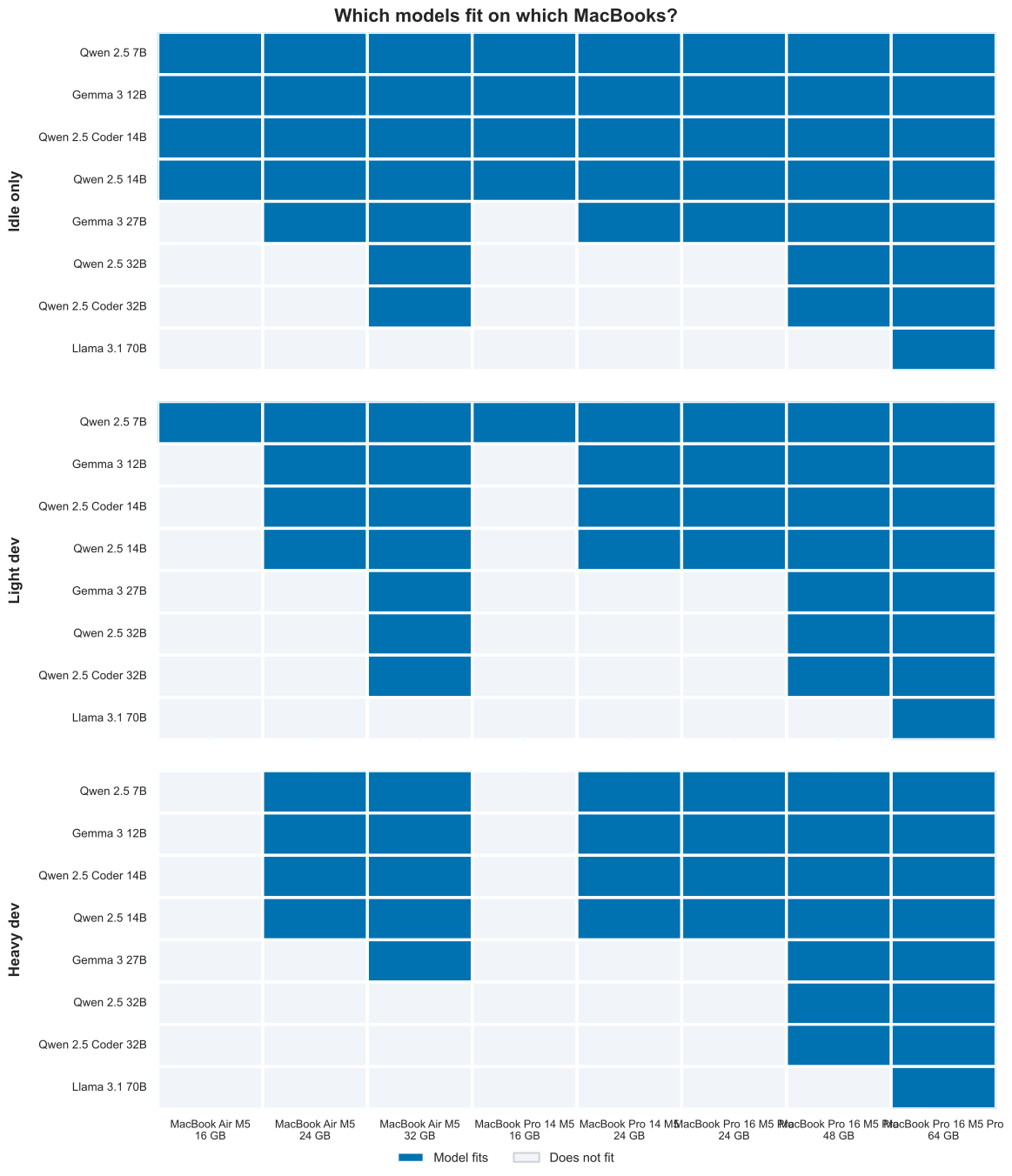
Fit matrix: rows are representative q4 models; columns are priced MacBook configs. Blue = model fits under that scenario’s memory reserve.
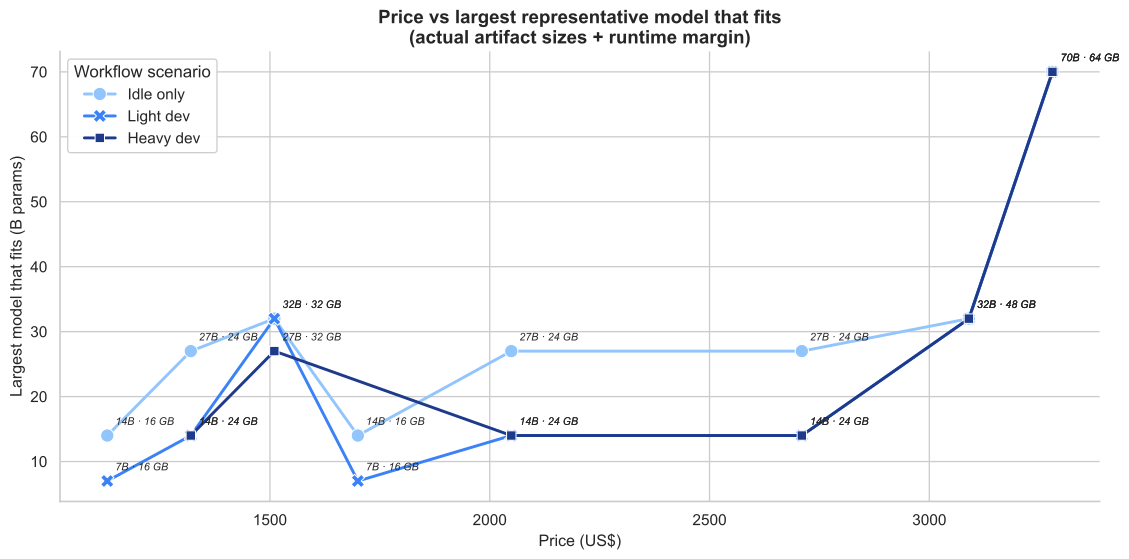
At a given price and workflow scenario, the frontier shows the largest parameter count that still fits.
2. What is a "good" model?
Quality bar: MMLU >= 80
We define "good" as a model scoring 80+ on MMLU (5-shot), a standard multi-task language understanding benchmark. This threshold was first crossed by models in 2024:
| Model | Year | Params (B) | MMLU | q4 Artifact (GiB) |
|---|---|---|---|---|
| Qwen 2.5 14B | 2024 | 14 | 79.0 | 9.0 |
| Gemma 3 27B | 2025 | 27 | 82.0 | 17.0 |
| Qwen 2.5 32B | 2024 | 32 | 83.0 | 20.0 |
| Phi-4 14B | 2025 | 14 | 84.8 | 9.0 |
| Llama 3.1 70B | 2024 | 70 | 86.0 | 43.0 |
Note: Phi-4 14B (MMLU 84.8) is a notable outlier. If its quality holds up across tasks, it would significantly lower the hardware bar since its artifact is only 9 GiB.
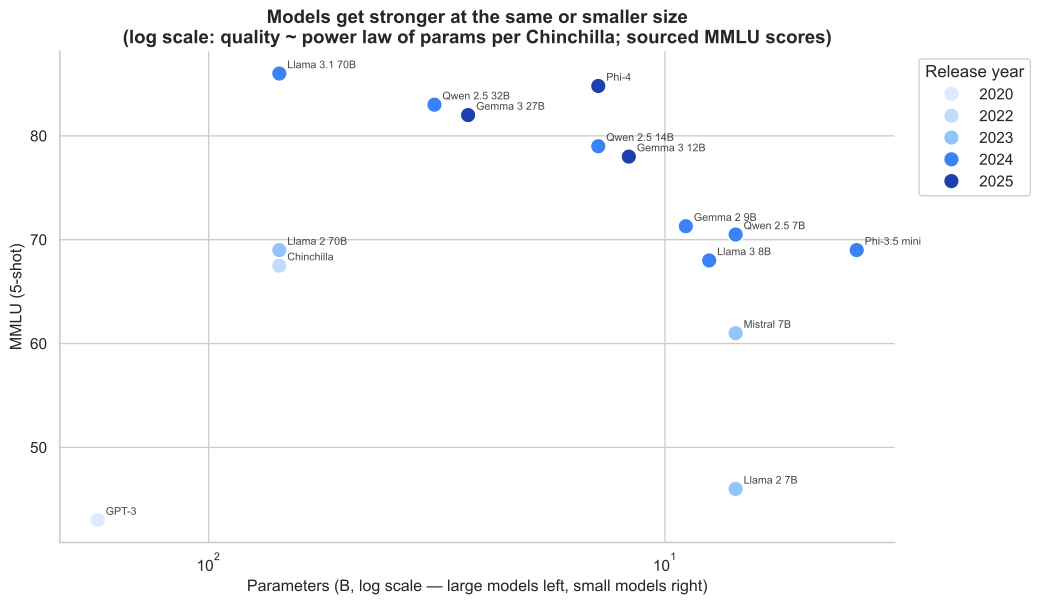
Quality rises over time at the same or smaller parameter counts (sourced MMLU scores).
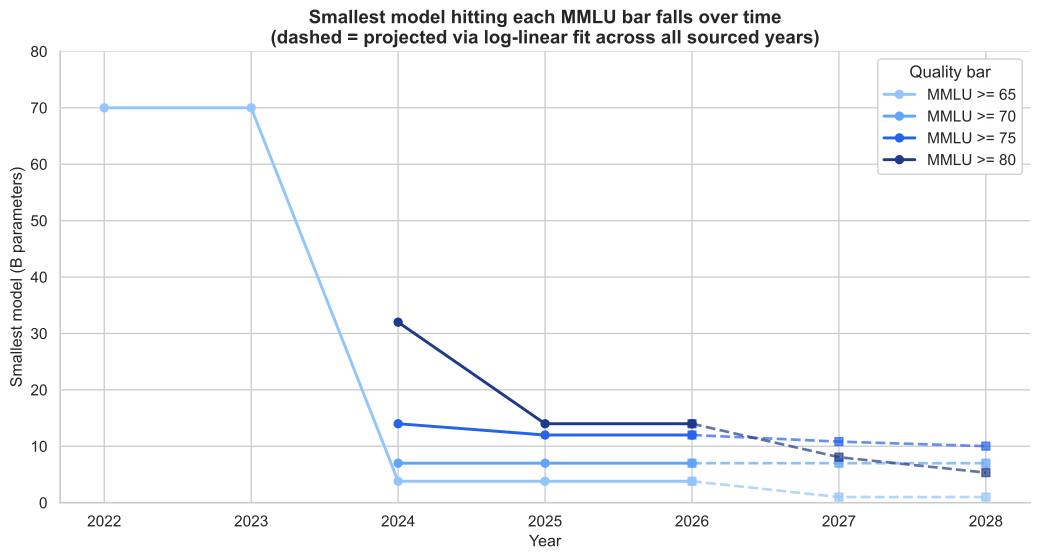
Demand-side pressure: the “good model” bar requires fewer parameters each year at fixed MMLU.
Memory requirement formula
total memory needed = model artifact (GiB)
                    + runtime margin (2.5 GiB for KV cache, runtime overhead)
                    + OS reserve (3.5 GiB)
                    + workflow reserve (0–6.5 GiB depending on scenario)
Speed requirement: memory bandwidth
Why bandwidth caps tokens per second. When the model generates each new token (decode), it must read weights and activations from DRAM. For large models on Apple Silicon, decode is often memory-bandwidth bound: the chip could do more math per second than the memory subsystem can supply bytes. Very roughly,
tokens/sec ∝ (memory bandwidth) ÷ (bytes touched per token)
The exact factor depends on architecture, batch size, KV cache size, and quantization. We do not measure tok/s here; instead we use a dimensionless proxy you can compare across chips and model sizes on one chart.
What is “artifact (GiB)”? The artifact is the on-disk weight file (and the same bytes resident in RAM once loaded): the quantized model you pull from Ollama or similar — e.g. ~9 GiB for a 14B-class model at q4_K_M. It is not the same thing as parameter count alone; it is the serialized size of the weights the memory bus must stream during inference.
GB/s vs GiB. GB/s (gigabytes per second) is the usual unit for DRAM bandwidth (decimal, 10⁹ bytes per second) — how vendors and Apple quote memory bandwidth. GiB (gibibyte, 2³⁰ bytes) is how tools often report file / model size. The table below forms a ratio bandwidth (GB/s) ÷ artifact (GiB). That mixes decimal bandwidth with binary-ish artifact sizes; treat it as an ordinal comparison between rows and columns, not a calibrated tok/s estimate.
Proxy = memory bandwidth ÷ artifact size for three reference models (q4 artifact sizes from this notebook’s models table: 14B → 9 GiB, 27B → 17 GiB, 32B → 20 GiB).
| Chip | Bandwidth (GB/s) | 14B q4 (9 GiB) | 27B q4 (17 GiB) | 32B q4 (20 GiB) |
|---|---|---|---|---|
| M5 base | 153 | 17.0 | 9.0 | 7.7 |
| M5 Pro | 307 | 34.1 | 18.1 | 15.4 |
| M5 Max 32c | 460 | 51.1 | 27.1 | 23.0 |
| M5 Max 40c | 614 | 68.2 | 36.1 | 30.7 |
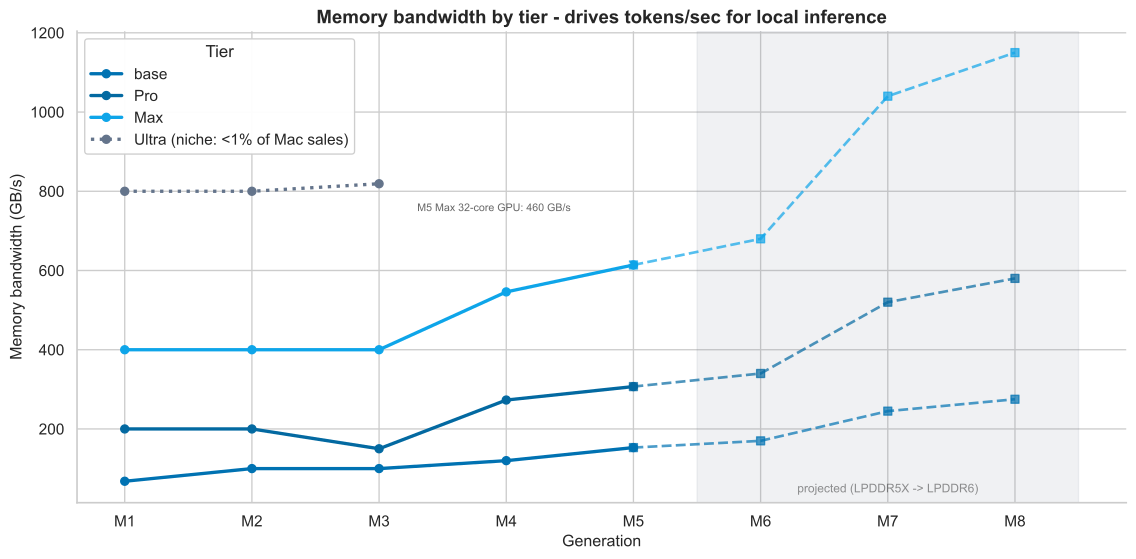
A proxy below ~10 tends to feel slow (laggy chat). ~10–20 is acceptable. ~20+ feels snappy. For 27B-class models, M5 Pro (307 GB/s) is roughly the floor for tolerable interactive decode on-device; base M5 (153 GB/s) is much tighter.
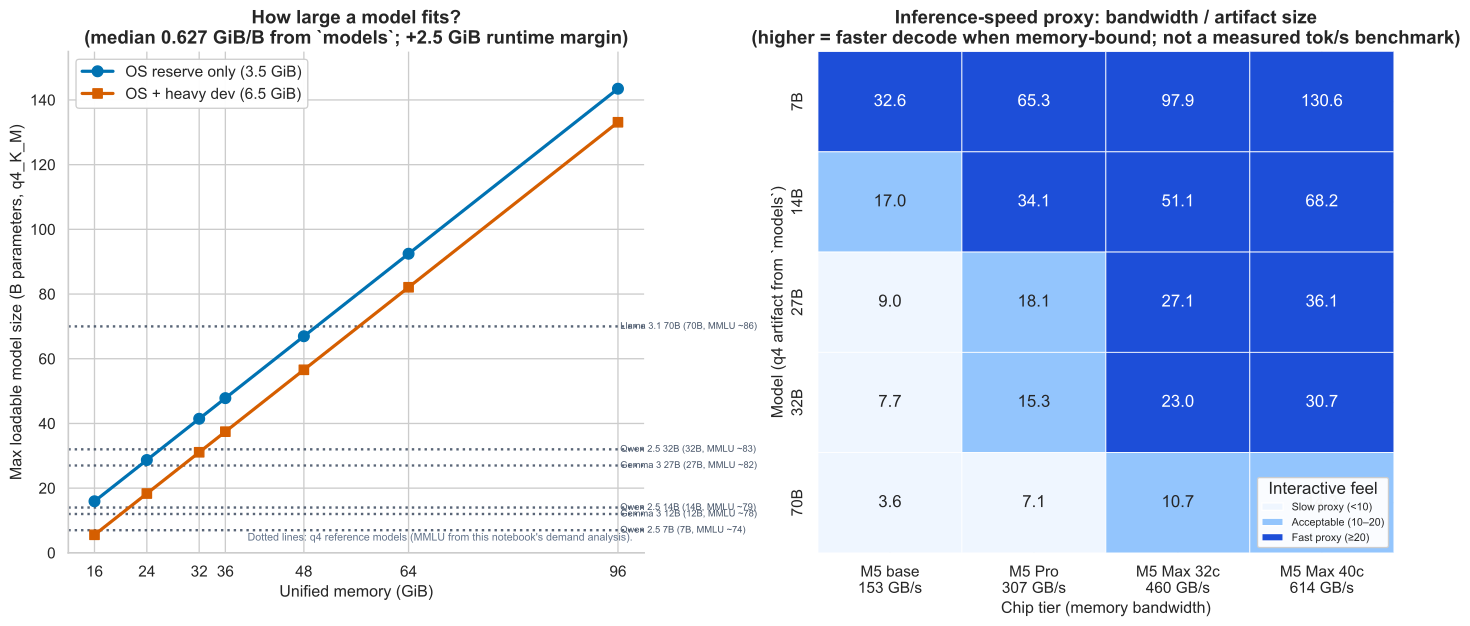
Left panel ties memory budget to model size; right panel approximates relative “interactive feel” when decode is memory-bound.
3. What are the specs of commodity hardware?
Current MacBook lineup (March 2026, Apple list prices)
| Machine | Memory (GiB) | Bandwidth (GB/s) | Price (USD) |
|---|---|---|---|
| MacBook Air M5 | 16 | 153 | $1,130 |
| MacBook Air M5 | 24 | 153 | $1,320 |
| MacBook Air M5 | 32 | 153 | $1,510 |
| MacBook Pro 14" M5 | 16 | 153 | $1,700 |
| MacBook Pro 14" M5 | 24 | 153 | $2,049 |
| MacBook Pro 16" M5 Pro | 24 | 307 | $2,710 |
| MacBook Pro 16" M5 Pro | 48 | 307 | $3,090 |
| MacBook Pro 16" M5 Pro | 64 | 307 | $3,280 |
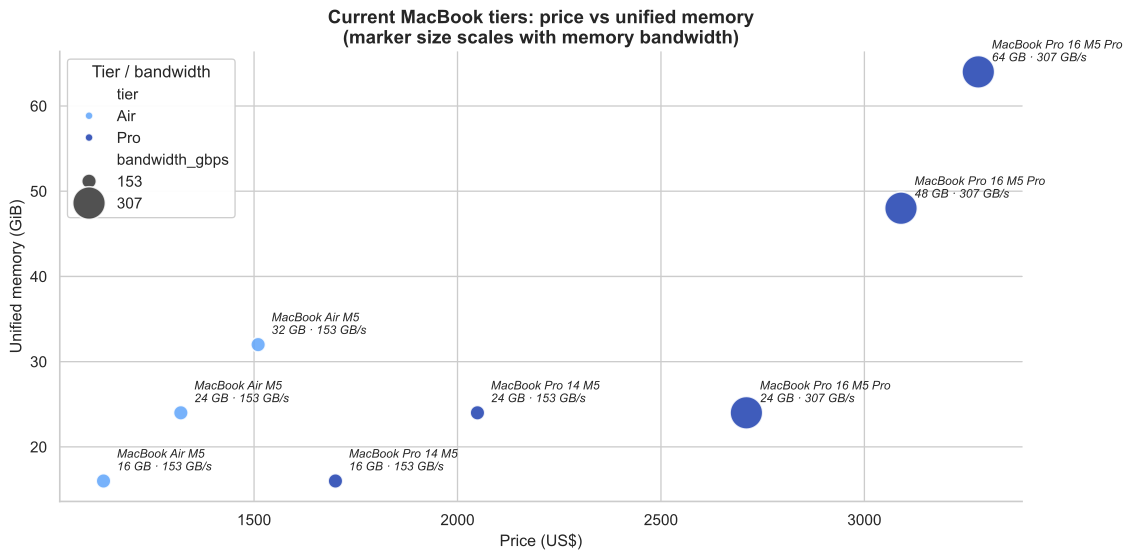
Key hardware facts
- Unified memory is the binding constraint on Apple Silicon. GPU, CPU, and neural engine share the same memory pool, so system RAM is VRAM.
- The M5 base chip provides 153 GB/s bandwidth. The M5 Pro doubles it to 307 GB/s.
- The jump from Air ($1,130–$1,510) to a 48+ GiB Pro ($3,090+) is approximately 2x the price for a machine that can actually run good models.
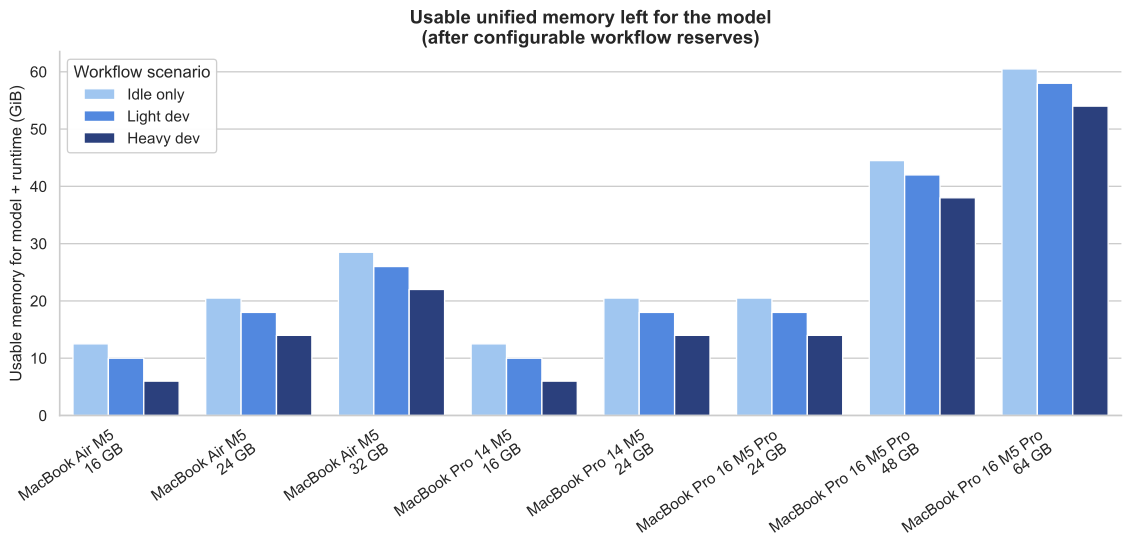
MacBook Air base-spec history
| Gen | Year | Base RAM | Price |
|---|---|---|---|
| M1 | 2020 | 8 GiB | $999 |
| M2 | 2022 | 8 GiB | $1,199 |
| M3 | 2023 | 16 GiB | $1,099 |
| M4 | 2025 | 16 GiB | $999 |
| M5 | 2026 | 16 GiB | $1,099 |
16 GiB became the base in 2023. This is sufficient for 7B-class models (q4 artifact ~4.7 GiB) but not for 27B+ "good" models.
4. When will reasonably priced hardware run good models?
This depends on two converging trends:
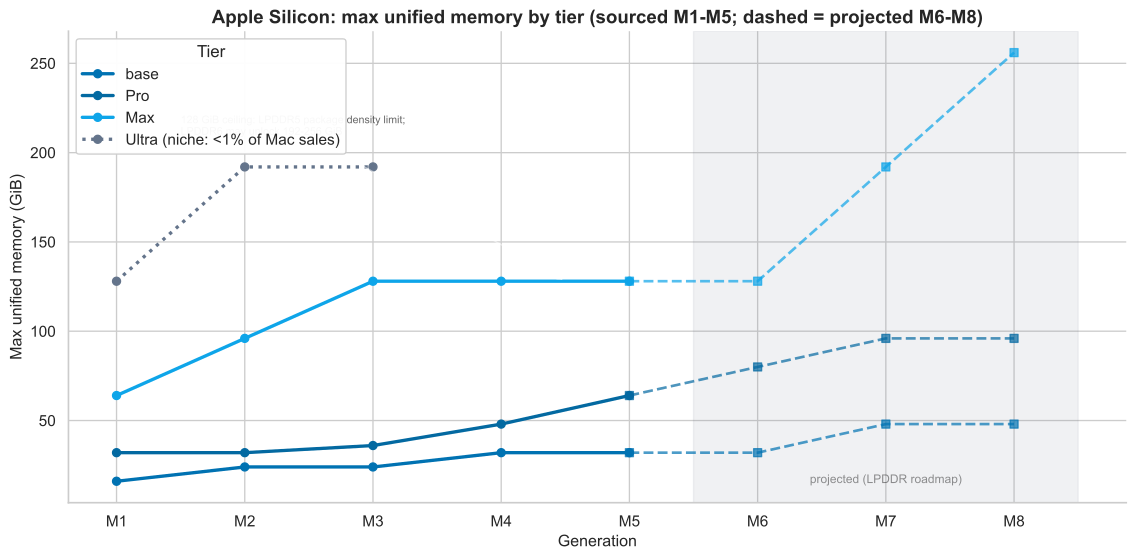
Supply side: hardware memory grows each generation
Pro-tier max unified memory (GiB) by generation:
| Gen | Year | Pro Max Memory | Model Budget (after 10 GiB OS+dev) |
|---|---|---|---|
| M1 Pro | 2020 | 32 GiB | 22.0 GiB |
| M2 Pro | 2022 | 32 GiB | 22.0 GiB |
| M3 Pro | 2023 | 36 GiB | 26.0 GiB |
| M4 Pro | 2024 | 48 GiB | 38.0 GiB |
| M5 Pro | 2026 | 64 GiB | 54.0 GiB |
| M6 Pro (proj) | ~2027 | 80 GiB | 70.0 GiB |
| M7 Pro (proj) | ~2028 | 96 GiB | 86.0 GiB |
Projections are based on JEDEC LPDDR6 roadmap (spec published July 2025).
Demand side: models get smaller at fixed quality
The smallest model hitting MMLU >= 80:
| Year | Model | Params (B) | q4 artifact + margin (GiB) |
|---|---|---|---|
| 2024 | Qwen 2.5 32B | 32 | 22.5 |
| 2025 | Gemma 3 27B | 27 | 19.5 |
| 2026 (proj) | ~25B | — | 18.0 |
| 2027 (proj) | ~20B | — | 15.0 |
| 2028 (proj) | ~16B | — | 12.0 |
The model demand projection uses a log-linear fit across observed data points, grounded in the "free-rider" dynamic: labs like Meta, Google, and Alibaba invest in over-training smaller models to reduce inference cost at cloud scale (per Sardana et al. 2024, "Beyond Chinchilla-Optimal"), then release them as open source (Llama, Gemma, Qwen). Local users benefit from this investment without paying for it.
Convergence answer: by price tier
Best unified memory available at each US price point, minus OS reserve only (3.5 GiB):
| Price tier | 2024 | 2025 | 2026 | 2027 (proj) | 2028 (proj) |
|---|---|---|---|---|---|
| <= $1,000 | 8 GiB | 16 GiB | 16 GiB | 16 GiB | 24 GiB |
| <= $1,500 | 16 GiB | 24 GiB | 24 GiB | 24 GiB | 32 GiB |
| <= $2,000 | 16 GiB | 32 GiB | 32 GiB | 32 GiB | 48 GiB |
| <= $2,500 | 24 GiB | 32 GiB | 32 GiB | 32 GiB | 48 GiB |
| >= $3,000 | 48 GiB | 48 GiB | 64 GiB | 64 GiB | 96 GiB |
Demand for the smallest MMLU 80+ model (q4 + margin) drops from ~22.5 GiB in 2024 to a projected ~12 GiB by 2028.
Approximate crossover points (when a tier can physically load the model, OS reserve only):
- >= $3,000: Already crossed (2024). Comfortable with headroom since M4 Pro.
- <= $2,000: Crosses ~2025-2026 (32 GiB - 3.5 GiB OS = 28.5 GiB budget vs 19.5 GiB demand). But bandwidth on base M5 (153 GB/s) makes 27B models slow.
- <= $1,500: Crosses ~2027-2028 depending on model shrinkage.
- <= $1,000: Not before 2028, and only if demand drops to ~12 GiB and hardware hits 24 GiB.
With a heavy dev workflow (IDE, browser, Xcode), add 6.5 GiB to the requirement. This pushes the comfortable crossover at the $2,000 tier out to ~2028.
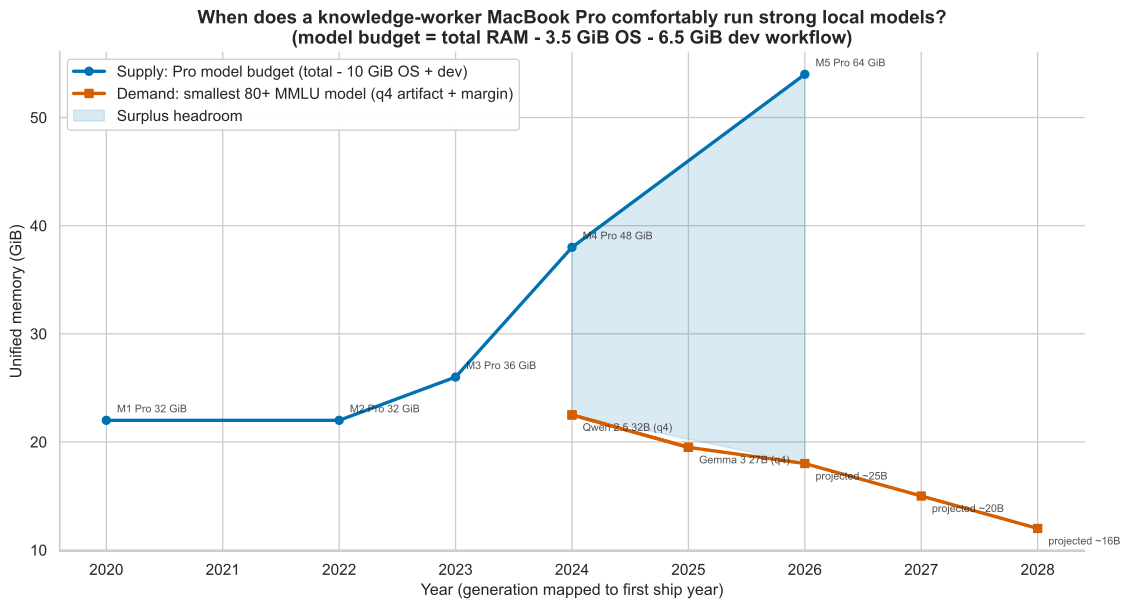
Supply line: Pro-tier configs over time. Demand line: memory needed for the best small model hitting the quality bar. Shaded region: surplus headroom.
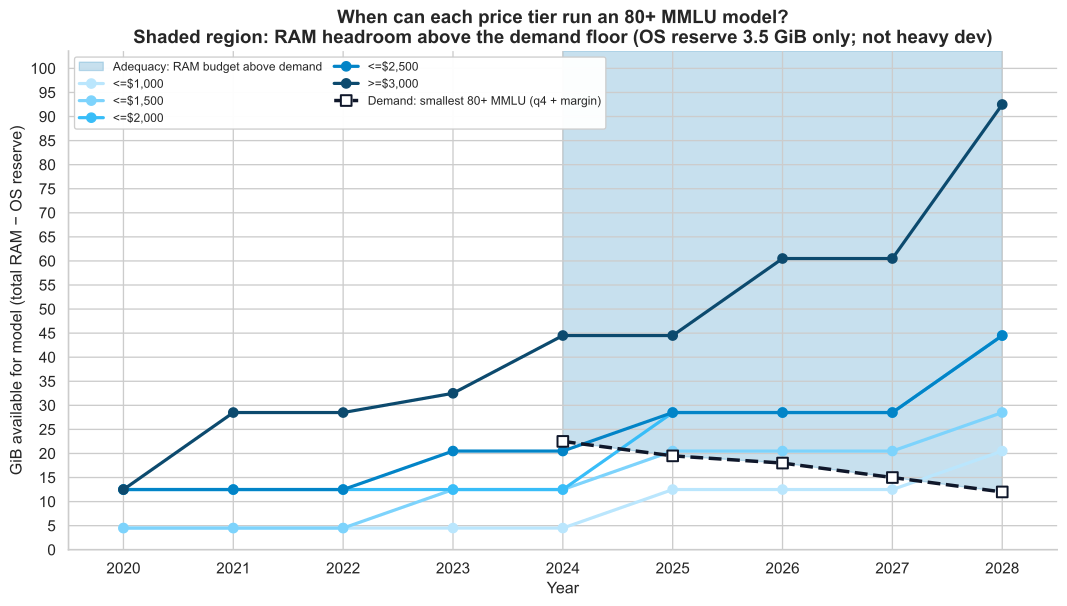
When a tier’s line sits in the blue “adequacy” band above the dashed demand line, that price band can physically load a “good” model in that year (ignoring heavy dev reserve).
5. Price premium: local hardware vs cloud API spend
Hardware upgrade premiums
Two reference upgrade paths to a machine capable of running good models:
| Upgrade path | From | To | Premium (USD) |
|---|---|---|---|
| M5 24 GiB → M5 Pro 64 GiB | $2,049 (Pro 14" M5 24GB) | $3,280 (Pro 16" M5 Pro 64GB) | $1,231 |
| M5 Pro 48 → 64 GiB (same tier) | $3,090 (Pro 16" M5 Pro 48GB) | $3,280 (Pro 16" M5 Pro 64GB) | $190 |
Cloud API subscription costs over 2.5 years (30 months)
| Service | Monthly (USD) | 2.5-year total |
|---|---|---|
| ChatGPT Plus | $20 | $600 |
| Claude Pro | $20 | $600 |
| API (moderate use) | $100 | $3,000 |
| API (heavy use) | $200 | $6,000 |
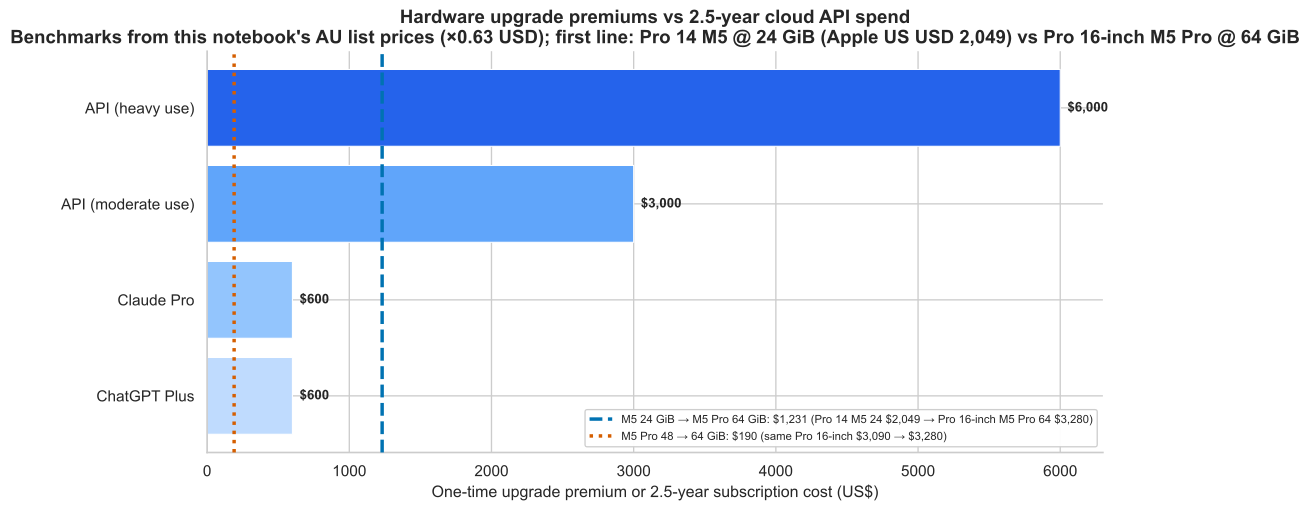
Vertical lines: memory upgrade paths from the hardware table. Bars: ChatGPT Plus, Claude Pro, moderate/heavy API spend over 30 months.
Comparison
- The $190 memory-only upgrade (48 → 64 GiB on the same M5 Pro chassis) pays for itself vs a $20/mo subscription in under 10 months.
- The $1,231 full path (M5 24 GiB to M5 Pro 64 GiB) is roughly equivalent to 2.5 years of a $20/mo chat subscription ($600) plus ~$600 extra. It costs less than 5 months of heavy API usage.
- For a moderate API user ($100/mo), the hardware premium pays for itself in 12 months and then runs for free for the remaining ~4 years of the laptop's life.
- For a heavy API user ($200/mo), the hardware premium pays for itself in 6 months.
However: local models are not SOTA. Cloud APIs serve GPT-4o, Claude Opus, Gemini Ultra -- models that score 85-90+ MMLU and have capabilities (tool use, multimodal, long context) that no local 27-32B model matches. The local option is a cost-efficient complement, not a replacement.
Key takeaways
-
"Good" local models (MMLU 80+) require 48+ GiB of unified memory on Apple Silicon today, after accounting for OS and workflow overhead. That is a $3,000+ MacBook Pro.
-
Memory bandwidth matters for usability. A 27B model on M5 base (153 GB/s) has a bandwidth proxy of ~9 -- it will feel sluggish. M5 Pro (307 GB/s) is the minimum for acceptable interactive speed on large models.
-
The crossover is happening fast. Both hardware (more memory per dollar) and models (higher quality at fewer parameters) are converging. By 2027-2028, a $2,000 MacBook should comfortably run models that match today's MMLU 80+ bar.
-
The hardware premium is competitive with cloud spend for moderate-to-heavy users over a laptop's lifetime, but local models are not equivalent to SOTA cloud APIs.
-
Local users free-ride on cloud economics. Labs over-train smaller open-source models to reduce their own inference costs. Those same models run locally on Apple hardware. Apple does not need to fund model training to benefit from this trend.
Data sources
Hardware
- MacBook Air (Apple AU): https://www.apple.com/au/macbook-air/
- MacBook Air specs: https://www.apple.com/au/macbook-air/specs/
- MacBook Pro (Apple AU): https://www.apple.com/au/macbook-pro/
- MacBook Pro specs: https://www.apple.com/au/macbook-pro/specs/
- Apple M5 Air footnote: 8K-token prompt, 14B parameter model, 4-bit quantization in LM Studio
Models (artifact sizes from Ollama tags pages, March 2026)
- Qwen 2.5: https://ollama.com/library/qwen2.5/tags
- Qwen 2.5 Coder: https://ollama.com/library/qwen2.5-coder/tags
- Gemma 3: https://ollama.com/library/gemma3/tags
- Llama 3.1: https://ollama.com/library/llama3.1/tags
MMLU scores
- GPT-3: Original MMLU paper (Hendrycks et al.)
- Chinchilla: Hoffmann et al. 2022
- Llama 2/3, Llama 3.1: Meta model cards
- Mistral 7B: Mistral announcement
- Phi-3.5 mini, Phi-4: Microsoft model cards / llm-stats leaderboard
- Gemma 2/3: Google model cards
- Qwen 2.5: Qwen technical report
Scaling laws
- Kaplan et al. (2020): power-law scaling of LLM loss
- Hoffmann et al. / Chinchilla (2022): compute-optimal training ratio
- Sardana et al. / "Beyond Chinchilla-Optimal" (2024, ICML): inference-cost-adjusted optimal training
Memory projections
- JEDEC LPDDR6 specification (July 2025)
Assumptions (configurable knobs)
These are not sourced facts and should be adjusted per scenario:
| Knob | Default value | Rationale |
|---|---|---|
| OS reserve | 3.5 GiB | macOS + background processes |
| Light dev workflow | +2.5 GiB | IDE + browser + terminals |
| Heavy dev workflow | +6.5 GiB | Xcode + simulator + browser + local tools |
| Runtime margin | 2.5 GiB | KV cache, runtime overhead beyond raw artifact size |
| AUD/USD | 0.63 | Approximate exchange rate, March 2026 |
Charts: /assets/economics-of-local-llms/*.svg. CSVs: /data/macbook_local_llm_*.csv. Source: posts/economics-of-local-llms.md.